A Really Big One: Exoframe Feel, Finished Belts, & Baseplates
Overview
This was an inspired month and I think it shows.
A ton was added, from finishing up proper-looking spline-based belts, to a very nice building snapping implementation, to a new unique power system that I think Bevy uniquely enables, to a lot of additional "feel" that really enhances the emotional feel of the game. FYI, the belt section is more technical. If that isn't your thing, it might be worth skipping.
Additionally, there is more detail below, but I will be giving a talk and running a workshop at GPN24, so if you are interested take a look.
So without further ado here we go.
As always, if you find this post interesting, or if you are interested in the game, I would recommend wishlisting it on Steam. It helps a ton.


Fully Finished Spline Belts
After a lot of work, I can finally say I have a belt system that I am happy with. Pretty important in a factory game.
The best part of it is that the belt routing system behaves predictably, preferring 90-degree turns and straight runs, while at the same time being able to handle odd angles and tight placement. The belt router will even bend its own rules to ensure players can connect to buildings under almost any circumstances.
That and the belts looking nice is just icing on the cake.
Proper Geometry
I am very happy to have excellent-looking spline-based belts based on the original tile-based belts. It took a few shots, but it turns out I could not avoid the "correct" approach regardless of my efforts.
The first approach I took (as seen in the last blog post) was to just take a "slice" from the original tile-based belt and build geometry on it. Easy but looked really bad.
The next approach I took was an evolution on this whereby I would take multiple "slices" or profiles from the original at key points and loop them along the spline, constructing triangles along the spline to hook everything up. This was much better, and if you were at the RustWeek Bevy Workshop you saw these in action.
The issue here was that the textures would look okay in some circumstances, but were misaligned in other circumstances, particularly on longer sections of CubicHermite spline with changes along multiple axes.
The hopefully final, and likely "correct", approach was just extracting the triangles, baking them into a custom *.belt_geometry.ron type, and reconstructing the mesh along the spline manually.
We have the original good mesh from Blender, and we just adjust the whole thing, normals and all, to be consistent with the spline. The only downside is that sometimes the last repeated "segment" of belt can look squished. But at this point I am happy.
The cool thing is that since we have *.belt_geometry.ron, adding additional faster/better belts will be easier. I can ask an artist to just make a 1m segment of the new proposed belt and I should be able to rebake it.
I did something similar for the legs and feet of the belt, but used Avian3D raycasting to ensure all feet touch the ground even on uneven terrain.
Item Alignment
Shorter one, but with the compound curves in the belt this just looks so elegant. (Or so I think at least.) After the belt stuff, this was easy: just keep the things on the belt tangent to the spline that defines the belt.
Belt Elevation
Lastly for belts, we can now adjust the belt elevation as we place them. Adding the UI was simple, but adding elevation rules was trickier than one might think. We can't just check for validity based on a downward ray cast. What if we are crossing a deep but short gap?
The solution I implemented boils down to IF all other conditions are met except for elevation_too_high, AND both ends of the belt are connected to an existing structure THEN we place the belt anyway. All legs that would be too long under the elevation_too_high rule are not generated
The in-game justification might be that the belt is supported by the connecting structures.
Building Alignment Snapping
This one is a cool quality-of-life change that really makes building organized and clean-looking factories possible.
Having played many 3D factory games I wanted to make it universal enough to handle things like snapping to inputs or outputs or both, or to enable snapping inputs to outputs and vice versa.
I think the goal was achieved pretty well.
While I did consider taking an Avian Raycasting approach, I went with an ECS approach where we query for input and output ports and just match against the potential building's input and output global x, y, and z locations + margin.
This lets us do clever things like prioritize "stronger" lineups and the like. I'm not doing anything that fancy yet, but I could foresee a world where you get your local snaps, but also snaps against 40 machines even if the nearest one is 200m away, just because 40 machines all in a line would be a meaningful signal.
All in all the building snapping system is what I would want in a factory game. That being said, once people start testing it, I suspect changes will have to be made.
Fully Working Baseplates
So far the game has involved placing factory machines on the ground. While on the perfectly flat ground of the small demo world this might be okay, as you scale your factory more organization becomes necessary.
The game now lets players place a grid of baseplates, grow the existing grid, or shrink it, all with snapping and the like working as one might expect.
What makes baseplates special in Exofactory is that they are not just "something to build on". They also act as power transmission for all buildings on top without the need for wires and manual hookup.
A grid of baseplates is also an independent power grid that hooks up to the "traditional" power grid via a number of substations that can be placed on the grid. Unlike traditional power grids, these substations can only transfer so much power to the baseplate grid. If you have only a few buildings you may get away with just one, but as more and more buildings are placed on the grid, more substations will have to be placed to keep up.
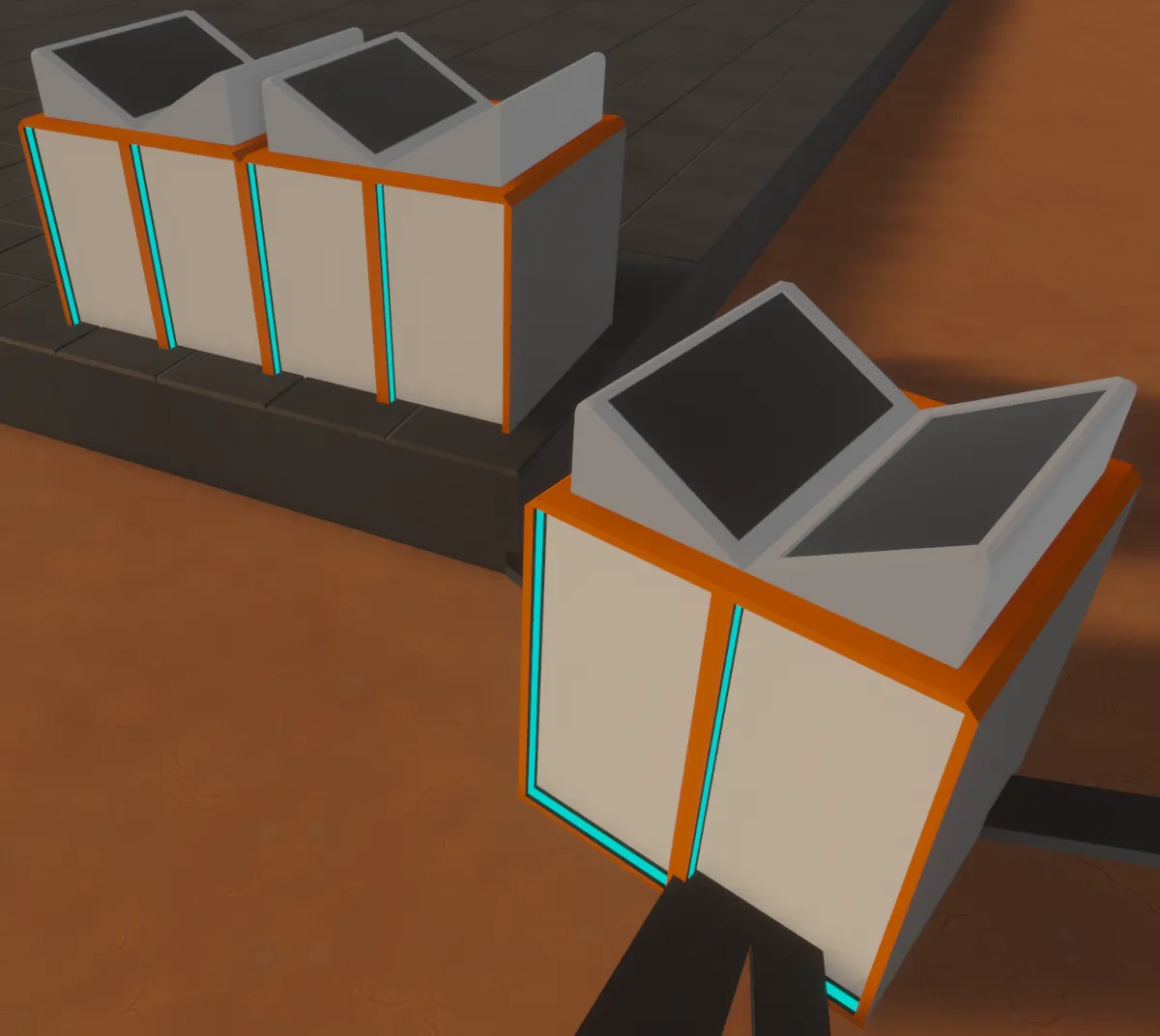
This brings up my "clearly made by a backend dev" new assets. After finishing the classic Blender doughnut tutorial I set out to make temporary assets that would not actively detract or distract from the feel of the game. This is what I made. The Power Substation and the smaller Power Relay.
I do intend to replace these eventually, and I would rather work with someone who knows more about Blender than I do, but due to outside circumstances resources are tight.
The game must go on, so self-created assets are the way. (For now.)
Under the hood this is all ECS and Bevy-idiomatic code. When we place or delete a baseplate, we add components that define a Bevy relationship between that baseplate and a baseplate grid entity.
This way we can easily query for the set of relevant baseplates, even when there could potentially be tens of thousands or more.
Buildings placed on top of the baseplates in turn get a relationship with that baseplate grid.
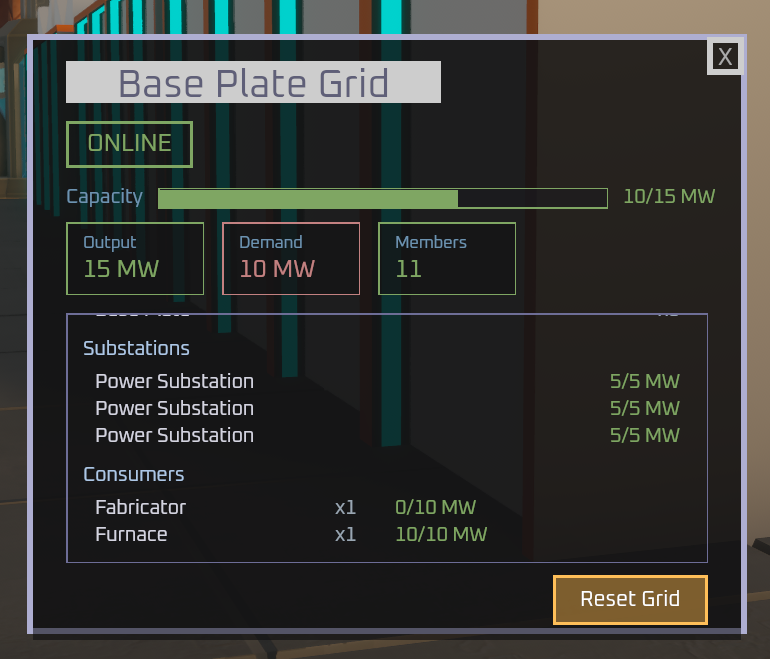
For power calculations, we just query the relevant relationships. Fast and idiomatic. What I really like is that the power UI for a baseplate grid shows all of the building details, but if you look in the "main" grid you only see the power draw of the substations.
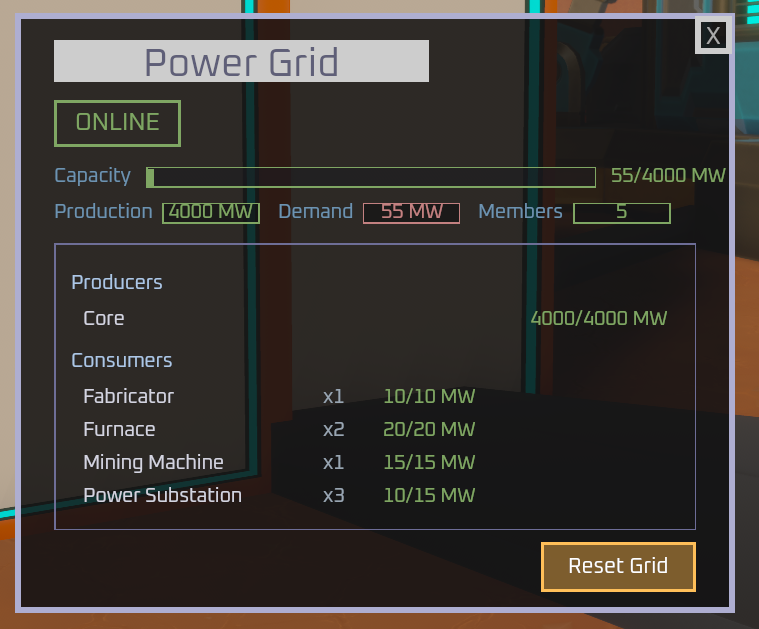
I haven't added it yet, but I could imagine being able to name baseplate grids and for that name to show up in the main power grid stats. Something like Screw Factory 1: 18.5MW/30.0MW, and in order to see the fine details you would need to check the UI of the substations.
Major Game Feel Improvements
During RustWeek 2026 (strong recommendation by the way) I volunteered to help with the Bevy workshop. As part of that workshop I ended up giving an impromptu demonstration of the game.
As a result, I got a ton of feedback from new and experienced Bevy devs, and new and expert game devs. Really useful, informative stuff.
Mostly it broke down to the following:
- Play around with BEING the little robot guy. The game should visually and auditorily signal this to players. You should feel a little connection to it.
- The global mode needs to be more visually distinctive; a little dialogue in the beginning explaining it is not enough.
- The transition between the two should be distinct and meaningful.
- Add some signals as to what the player can do, even if it's "new speed record achieved" when you run on top of a belt.
There was much more, but these are some of the bigger things.
For the global mode I worked quite hard on several fullscreen material shaders and a few easier add-ons. Now we have a very cool loading effect when you transition. The goal is to sort of show the digital nature of the mode.
I noticed something when I was playing Silksong that I implemented here. In Silksong, when you first load up the game or fight a boss for the first time in a while, you get the full boss fight start animation. When you are losing the fight and try over and over again, that intro animation is skipped.
I do something similar here. If you haven't switched in a while, you get the full transition effect. If you are switching frequently you get a MUCH shorter one. Out of game, this leads to less annoyance. In game, I imagine it's that the rendering is still cached.
Quite happy with it so far. But more is still to be done.
For the Exoframe (robot mode) we already had chromatic aberration, but I also added lens flare in the shape of the Exoframe lens, some camera grit, some lens focus animation, walk waddle, an Exoframe-specific HUD, and more distinct sounds.
This all REALLY makes the Exoframe feel more connected. With the Silksong-style animation cooldown it's all upside and no downside.
Once again thanks everyone who gave feedback.
RustWeek 2026 & Upcoming GPN Presentation
All of the feedback above was given at RustWeek 2026, and despite some social exhaustion on my part, it was a ton of fun. I had the chance to work with the excellent Chris Biscardi and hash some things out on the glTF code I want to contribute to Bevy.
Hopefully we should see some fruit there soon.
If anyone asks me "Why did you choose Bevy? Isn't that a risk over Corpo-engine?" I would respond with, "Bevy is the only game engine I know of that has a culture wherein I can spot a problem, submit a patch and have it fixed upstream in under a month." It's the only engine where I, an indie dev, can submit an architectural change, have that change reviewed by the core team and submitted without a ritualistic dance.
Stepping back though, I do plan on being at GPN24 from June 4th through June 7th and will give a talk on writing games in Bevy in Rust and run a workshop. Details can be found at:
If you are interested, I encourage you to come.
Conclusion
RustWeek was a source of inspiration and drive, even as a relative introvert. Super happy with the progress I made and excited to contribute more to Bevy. Exciting month for sure.
And once again, if you found this enjoyable, informative, or just like the game, I would suggest giving the game a wishlist.